What is a class fish tank? A free smart board setup guide
A guide for teachers · Updated: · Motivasyon TV team
In short: A class fish tank (class aquarium) is a classroom management method where every student gets a fish on the smart board, and positive behavior feeds the fish and helps it grow. The teacher gives points from a phone, food drops for the student's fish, and the whole class sees it on the board at the same time. Points are never taken away, the fish never dies and nobody loses on screen. Setup needs no software: create a free teacher account, add your class, open motivasyontv.com/tahta in the board's browser and enter the code on your phone. Preschool uses pictures and movement instead of numbers; elementary uses individual points and a shared class goal together.
What is a class fish tank?
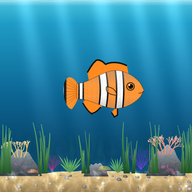
A “class aquarium” is now the name of a whole type of classroom app, not one product. The idea is simple: a virtual aquarium swims on the classroom's big screen and every student has their own fish there. When a student helps a classmate, turns in homework or raises a hand to speak, the teacher gives them a point, and that point appears as food dropping for the student's fish.
The difference from a classic sticker chart is that the reward is alive and visible. A sticker on paper is a number; a fish on the board that eats, grows and brings decorations and babies to the aquarium is a story for a child. Students ask “how is my fish?” instead of “how many points do I have?”, which strengthens the link between behavior and result, especially for younger kids.
A well-run class aquarium has three basic rules:
- Only add, never subtract: points are never taken away and no minus signs appear. At worst the fish gets hungry; it never dies.
- Don't break the lesson flow: points are given with one tap from the teacher's phone. No walking to the board, no stopping the lesson.
- A shared goal: next to the individual fish there is a goal the whole class fills together, so students support each other instead of competing.
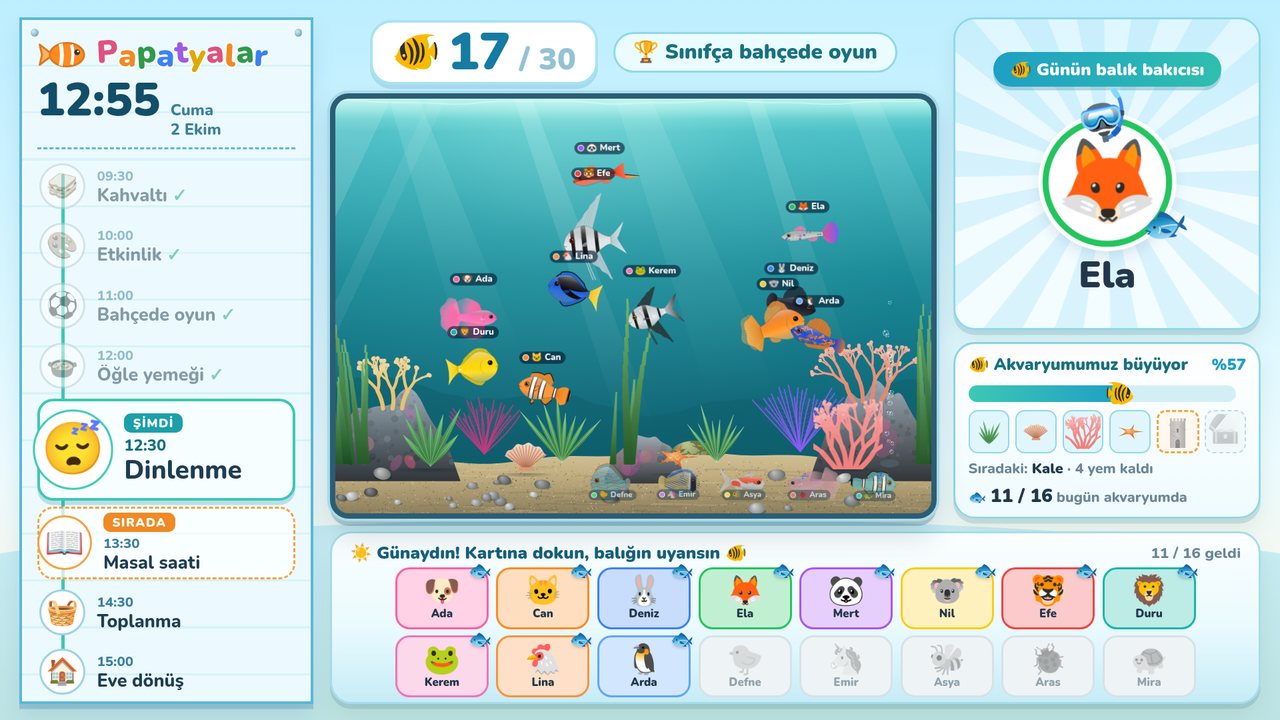
Want to see the screen yourself? Open the live preview: it runs with a sample class, silently, without an account.
How it works
A class aquarium uses two screens: the big screen (smart board, classroom TV or projector) and the teacher's phone. The big screen only displays; everything is managed from the phone.
- The teacher taps a student on the phone, then a behavior (for example “Helped a classmate +10”).
- Food drops for that student's fish on the board and the student's name is said out loud.
- The point also counts toward the class's shared goal; as the goal fills, the aquarium gets richer.
- When the whole class achieves something together, the “Whole class” reward feeds every fish with one tap.
Recognition happens instantly and in front of everyone, while the teacher stays in the flow of the lesson. Because every point is logged automatically, it's easy to check at the end of the week who might have been overlooked.
Free setup, step by step
Setup takes a few minutes. All you need is the board's browser and your own phone.
- Create a free account. Sign up at motivasyontv.com on your phone. On the sign-up screen, choose Teacher for elementary or Preschool / kindergarten for younger classes.
- Create your class. Add students by first name or nickname, up to 40 per class. No last names, photos or emails.
- Check the behavior list. A ready-made list is included. Change the names, icons and points to fit your class and add new ones if you need to.
- Open the address on the board. Type motivasyontv.com/tahta in the board's browser. A QR code and a 6-digit code appear.
- Pair it with your phone. On your phone go to Log in → Settings → Connect board / TV and type the code or scan the QR code. The board connects once and remembers it.
- Give a test point. Before class, give a point or two to see what changes on the board and set the volume so it doesn't drown out the lesson.
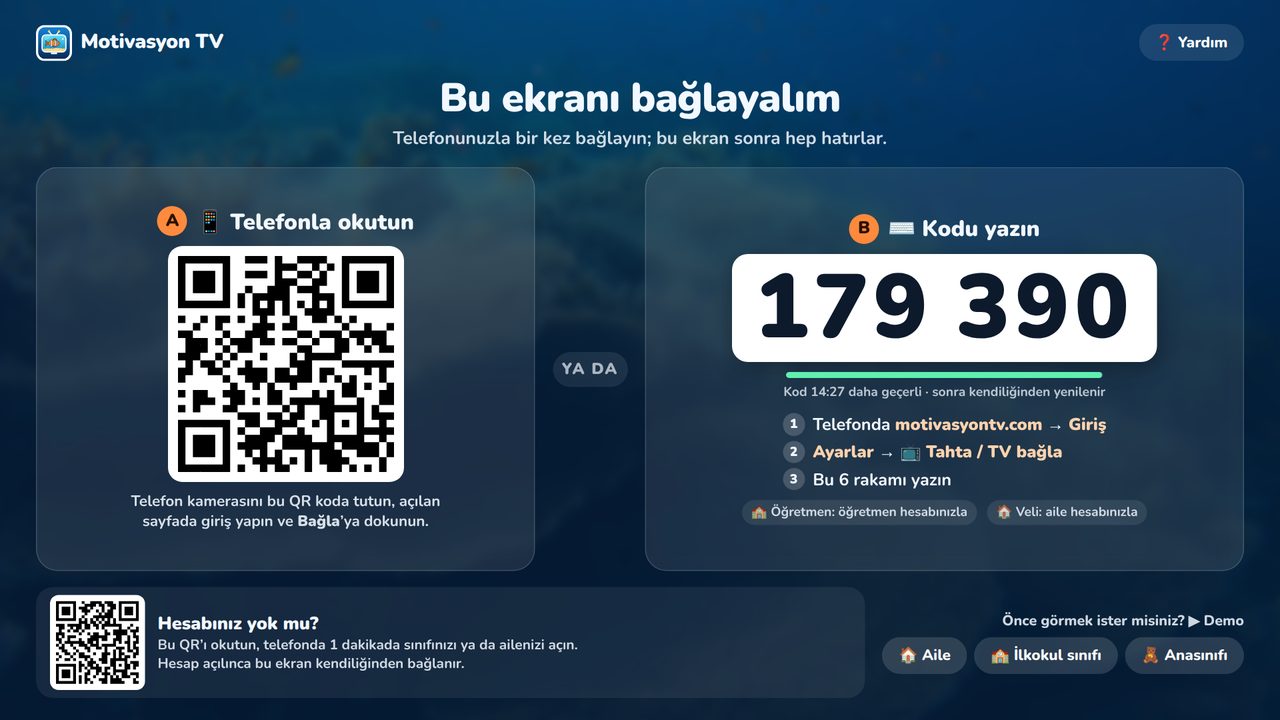
On Android-based and other interactive panels, the board's own browser is usually enough. If it's very old, open the page from a computer connected to the board.
Preschool vs. elementary
The same aquarium idea works differently for the two age groups. For a child who can't read and is just learning numbers, “+5” means nothing; a fish that wakes up, eats and grows says a lot.
Preschool and kindergarten (ages 4–6)
The preschool board offers an Aquarium theme (you can also switch to the pom-pom jar, flower garden or space theme). The day goes like this:
- Morning check-in: an absent child's fish sleeps at the bottom. When the child taps their card on the board, the fish wakes up and swims to the top. Check-in uses the child's icon, not a photo.
- Food: for positive behavior, food drops for the child's fish; it eats and grows a little.
- The class aquarium: as the class nears its shared goal, plants, shells, coral, a starfish, a castle and a treasure chest appear; when the goal is reached, baby fish arrive.
- Also on the board: helper of the day, visual schedule, transition timer and noise meter, plus team games and the Magic Board for finger drawing.
In preschool the focus is the shared goal, and goals are kept short (the same day or a few days). For short games to play on the board, see smart board games.
Elementary (grades 1–4)
In elementary classroom mode every student's fish swims with their name and behavior point values are shown (“Turned in homework +5”, “Helped a classmate +10”). Individual progress and the class goal work together, and the goal period can be a week or two. A two-team quiz and a weekly class schedule can also be shown on the board.
| Topic | Preschool | Elementary |
|---|---|---|
| What's on screen? | Fish waking up, food, a decorated aquarium | Fish with names, and points |
| Check-in | Each child taps their card in the morning | Not needed |
| Focus | Shared class goal | Individual points + shared goal |
| Number of behaviors | 3–4 behaviors | 4–6 behaviors |
| Goal period | Same day or a few days | One or two weeks |
Which behaviors should earn food?
Pick behaviors that are visible, stated positively and short. “Behave” is an expectation; a student can't tell what counts. “Raised a hand to speak” is something everyone can see.
| Area | Example behavior | Suggested points |
|---|---|---|
| Responsibility | Turned in homework | +5 |
| Participation | Participated, asked a great question | +5 |
| Friendship | Helped a classmate | +10 |
| Routines | Kept desk tidy | +5 |
| Kindness | Was kind | +5 |
| Effort | Read a book, didn't give up on a hard problem | +10 |
In preschool, keep it even simpler: three or four behaviors like “Tidied up toys”, “Waited for a turn” and “Shared a toy” are enough. Rewarding only academic success leaves out students whose success isn't visible yet; put effort and friendship on the list too. More on choosing behaviors and point values in the classroom reward system guide.
Fair points: every fish should get fed
Because every student's fish is on screen, a fish that never gets food is visible to everyone too. That makes fairness even more important than with a paper chart.
- Check at the end of the day. If the log on your phone shows a student with no points today, deliberately create a chance for them tomorrow: a job, a turn at the board.
- Don't forget quiet students. Louder students get noticed more. Working quietly and waiting for a turn should earn points too.
- Use the whole-class reward. When the class is ready on time or lines up quietly, feed everyone's fish at once.
- Don't inflate points. If everything earns a point, food loses its meaning. Remove behaviors that have become habits and add new ones.
- Don't rank. Instead of “whose fish is biggest?”, ask “how full is our aquarium?”.
Common mistakes
- Starting with too many behaviors. Students can't remember them; start with four or five and change them over time.
- Not introducing the system. Read the list together in the first lesson and act out each behavior. Students who know what earns food find the system fair.
- Giving points late. Points handed out at the end of the lesson lose their link to the behavior. Give them right after the behavior.
- Using the fish as a threat. “Keep that up and your fish will go hungry” turns the system into punishment. Handle unwanted behavior with a short, calm one-on-one talk, not with points.
- Leaving the volume too loud. Spoken praise boosts recognition, but it shouldn't drown out the lesson.
- Dropping it after a few weeks. Students notice inconsistency right away. Refresh the behavior list if needed, but keep the aquarium going.
Connecting with families
- Class code in elementary: the teacher shares a class code with families. At home the child practices on the TV and the teacher sees on the “Practicing at home” screen who practiced this week. The board shows how many days each student practiced, never how many mistakes they made. (The practice questions follow the Turkish curriculum and are currently in Turkish.)
- Class schedule: if the teacher has entered the weekly timetable, connected families see the next day's lessons in their panel.
- An aquarium at home: with a family account, the child has their own aquarium on the home TV. Their fish is fed and grows as they brush their teeth or tidy their toys, so the game they know from school continues at home.
When you talk to families, present the fish as the class's shared game, not a report card. “Who did you help in class today?” steers the conversation at home toward positive behavior better than “how much food did your fish get?”.
Frequently asked questions
Is the class fish tank free?
Yes. In Motivasyon TV the class aquarium is free for a teacher's class and has no ads. Extra features for daycares and preschools (parent pickup alerts, daily reports, a multi-class dashboard) are in paid school packages; see the schools page.
Do I need to install software on the smart board?
No. The class aquarium runs as a web page: open motivasyontv.com/tahta in the board's browser and enter the 6-digit code on your phone or scan the QR code. The board connects once and remembers it.
Do students need an account or email?
No. Only the teacher creates an account; students are added by first name or nickname. No email, phone number or photo is asked for. Up to 40 students per class.
What happens to the fish of a student who hasn't earned points?
Nothing is lost. Points are never taken away, the fish never dies and no minus signs appear on screen. In the preschool aquarium theme, an absent child's fish sleeps at the bottom and wakes up when the child checks in.
Do preschoolers who can't read understand the class aquarium?
Yes, because the preschool screen works with pictures and movement instead of numbers. Each child taps their card in the morning and their fish wakes up; positive behavior drops food for their fish. As the class nears its shared goal, decorations appear in the aquarium, and when the goal is reached, baby fish arrive.
Can I use it on a non-touch screen?
Yes. Since the teacher gives points from the phone, a classroom TV, projector or computer screen works too. A touch board is easier for tap-to-check-in attendance in preschool.
Have your class fish tank swimming by tomorrow
Create a free account, add your students by first name or nickname, open motivasyontv.com/tahta on the board and enter the code. An ad-free class aquarium that never takes points away and never asks for student emails, ready in minutes.